// Platform — Collaboration
Fix it where it happened. Pins, threads, roles.
Open tickets appear as pins on the exact elements they were filed against — for everyone on the team, on the live page. The thread, the mentions and the statuses live right there too.
Pins appear on the page
Every open ticket pins the element it was filed against — visible to the whole team, per exact pathname.
Talk it out in-page
Click a pin and the thread opens right there — the report is the first message, comments follow chronologically.
Resolve and it's gone
Resolving the ticket removes the pin. Resolution can happen in Rebase or arrive from your tracker via sync.
// One list, zero dashboards
Every ticket, on the site it's about.
The Tickets menu shows every open ticket across the site, newest first — with filters for reporter, page, and 'mentions me'. Selecting one takes you to it.
- Capped at the 100 newest open tickets
- Same page: smooth-scrolls the pin into view and opens the thread
- Other pages: navigates you straight there
// Threads at the element
The conversation has coordinates.
Pins carry the discussion with them — comment counts shift their color, and hovering shows the title and reporter. Notification emails deep-link to the page with the right ticket open.
- @mentions autocomplete over your roster — name, email or @handle
- Mentions are stored by handle, so renames don't break them
- Priorities — low to urgent — independent of the AI's severity
 Thread · /checkoutRB-141
Coupon field clears itself on blur
openhigh4 comments
pin#coupon-input · on the live page
@danamentioned — emailed instantly
priorityhigh — set by your team
statusopen → in progress → resolved
resolve it and the pin leaves the page
// The details
Made for real teams. Without the sludge.
- Four roles, enforced in the UI and the API
- Owners and team resolve tickets and see capture data
- Commenters file and discuss; viewers are read-only
- Only open tickets pin the page — per exact pathname
- Emails deep-link to the customer page, not a dashboard
- Comments up to 5,000 characters, 50 per ticket
- Optimistic UI — instant render, clean revert on failure
- The reporter's thread morphs into the developer Debug view
Frequently asked questions
No. Pins, threads, the ticket list and the Debug view all live in the widget on your own site — and notification emails deep-link to the page with the right ticket open.
Owners and team can resolve tickets and see capture data. Commenters can file and discuss. Viewers are read-only. The four roles are enforced in the UI and the API.
Its pin disappears from the page for everyone. Resolution can happen in Rebase or arrive from GitHub, Linear or Asana via status sync.
The project-wide ticket list shows the newest 100 open tickets with filters for reporter, page and 'mentions me' — and selecting one jumps you to its pin.
// Keep exploring
The rest of the platform. It all works together.
Capture
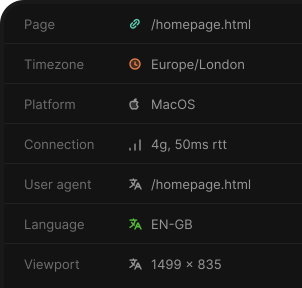
Click to report — console, network, steps & a screenshot.
Triage & AI
Summary, severity & the suspected file — evidence-linked.
Detected issues
Uncaught errors from real sessions, queued for review.
Issue-tracker sync
Files into GitHub, Linear, Jira & Asana. Two-way status.
AI agents (MCP)
Five MCP tools with scoped, revocable tokens.
Team & notifications
Invites, roles, unlimited users — mentions instant, the rest digested.
Privacy & security
Masked by default, scrubbed twice, isolated per tenant.
Start shipping feedback faster.
Start your 7-day free trial.