// Platform — Issue-tracker sync
Lands in your tracker. No second inbox.
Every report files into GitHub, Linear, Jira or Asana as a structured issue, mapped to the right project — with no new workflow for your team to learn.
Connect your tracker
Link GitHub, Linear, Jira or Asana and choose where reports should land.
Reports file themselves
Every capture becomes a structured issue in the right project — formatted the way your tracker expects.
Status syncs both ways
Close it in your tracker and it closes in Rebase. No drift, no duplicate bookkeeping.
// Structured, not pasted
Issues, not attachments.
Reports arrive in the tools your team already lives in — proper issues with the AI triage formatted into the body and the full context attached, not screenshots to untangle from a thread.
- Drafted the moment the ticket is created — queued, with retries
- The screenshot is embedded in the issue itself, not linked
- Smart labels: rebase, plus the AI's classification
[Rebase] Pay now button does nothing on checkout
filed by rebase · no copy-paste
// Two-way sync
Close it once.
Rebase keeps both sides honest. Resolve the issue where your engineers work and the Rebase ticket follows — its pin leaves the page. Prefer filing by hand? Every thread has a push-to-tracker control.
- Close it there, it resolves here — reopen it, it reopens
- Field mapping on GitHub, Linear and Jira — your taxonomy, not ours
- Duplicates detected and linked, with a cross-reference on the canonical issue
// The details
Your tracker, your rules. Wired in minutes.
- Pick the destination: repo, team + intake state, project or workspace
- Auto-create on new tickets — a toggle per integration
- A push-to-tracker control on every ticket thread
- Tracker badges on tickets — #142 or ENG-142 jumps to the issue
- AI triage formatted into the issue body
- Map priority and status onto labels, fields or workflow values
- Tokens stored encrypted and refreshed before they expire
- Disconnect any time — existing issue links are preserved
Frequently asked questions
New tickets can draft a tracker issue immediately — title, description, AI triage, screenshot — or you push manually from the thread. Status changes sync back automatically, and each direction is toggleable.
Yes — map priority and status onto your tracker's labels, fields or workflow values on GitHub, Linear and Jira. Your taxonomy, not ours.
Near-duplicates are detected, marked and linked to the canonical ticket — and the canonical tracker issue gets a 'see also' cross-reference comment, so related reports stay visible from the original issue.
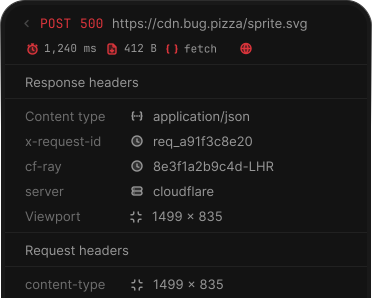
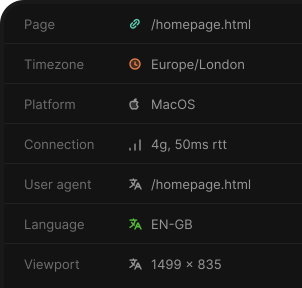
The flagged element, the last 50 user actions, the last 50 console errors and warnings, the last 50 network requests, a device and environment snapshot, and a screenshot — merged into one time-ordered timeline: Clicked 'Save' → POST /orders returned 500 → TypeError follows.
// Keep exploring
The rest of the platform. It all works together.
Capture
Click to report — console, network, steps & a screenshot.
Triage & AI
Summary, severity & the suspected file — evidence-linked.
Detected issues
Uncaught errors from real sessions, queued for review.
Collaboration
Pins on the live page — threads, mentions & roles.
AI agents (MCP)
Five MCP tools with scoped, revocable tokens.
Team & notifications
Invites, roles, unlimited users — mentions instant, the rest digested.
Privacy & security
Masked by default, scrubbed twice, isolated per tenant.
Start shipping feedback faster.
Start your 7-day free trial.